 Talkalo
They answer a normal call
Call a supported mobile or landline number. The recipient does not need Talkalo or a special invitation.
Use Talkalo on iPhone to call a supported mobile or landline number with two-way translated speech and bilingual captions in your app. The other person answers their usual phone, without installing an app.
Explore the walkthroughDevices, cost and setupCompare phone translation options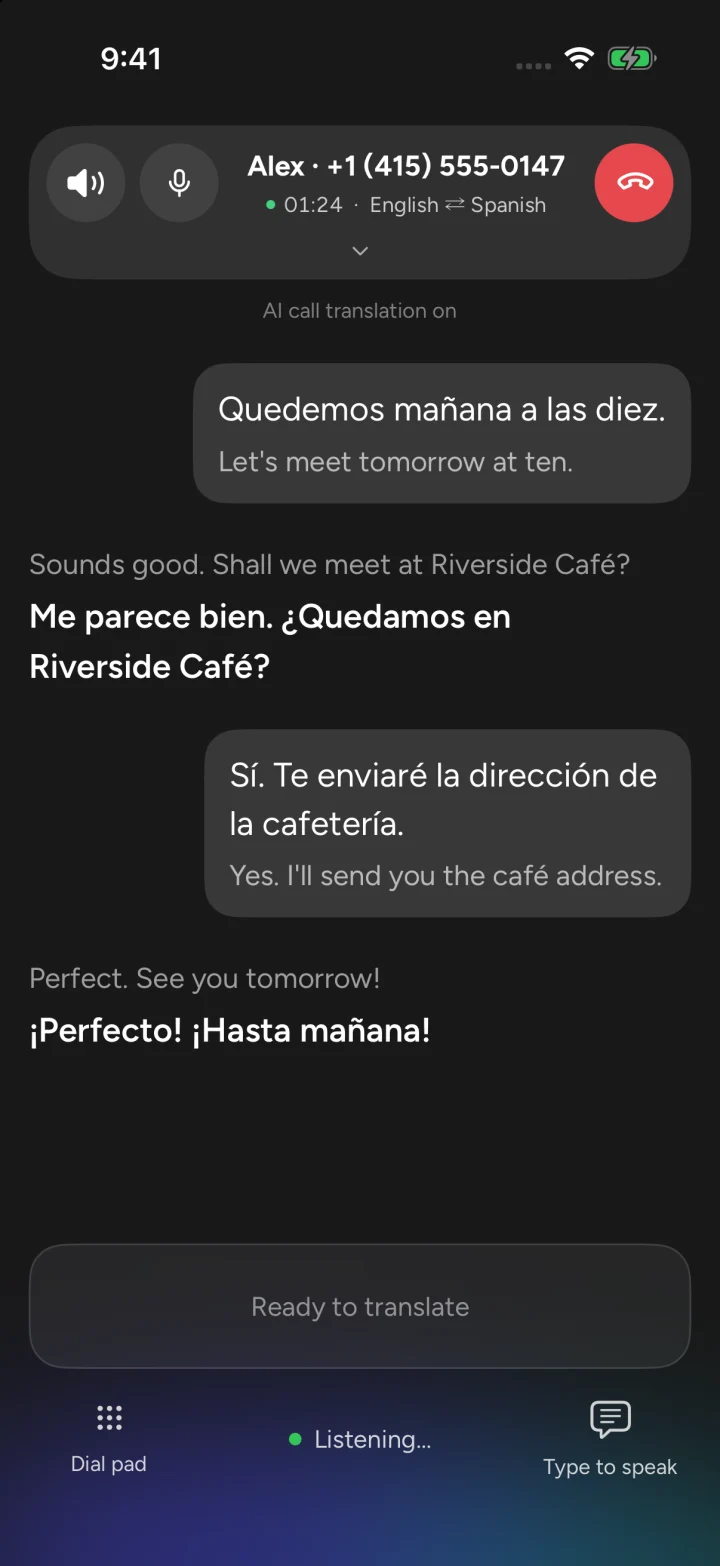
Quedemos mañana a las diez.
Let's meet tomorrow at ten.
Call a supported mobile or landline number. The recipient does not need Talkalo or a special invitation.
Follow the original and translated words as you talk. Check names, times and addresses together.
Write a reply and have Talkalo translate and speak it into the call. Useful when spelling out a name or address.
Talkalo lets you dial a supported mobile or landline number from your iPhone and translate speech in both directions. You hear the other person in your chosen language; they hear your words translated into theirs. You can also read the original and translated text in Talkalo. The recipient answers a normal phone call without installing an app.
Open phone calling in Talkalo, choose each speaker’s language and confirm that two-way translation is on.
Enter a supported mobile or landline number with its country code. Review the destination quote and usable credit balance before dialing.
The recipient answers normally. Take turns speaking, listen to translated speech and check names, times and addresses in your bilingual captions.
Chinese–English: call a hotel abroad to confirm check-in time, a reservation or an address.
English–Spanish: call a landlord or repair service and confirm the appointment in bilingual text.
Example situations, not customer testimonials. Take turns speaking and confirm important details; translation can make mistakes.
Need video and captions for both people? Explore video call translation.Read the full credits and Pro guideConsider Talkalo when you want to call a supported mobile or landline number from an iPhone, hear translation both ways and read bilingual captions without asking the recipient to install an app. Talkalo runs on iOS 16 or later with internet access and credits. If your existing phone already provides call translation for your language pair and region, its built-in option is also a sensible starting point.
Talkalo uses online translation on iOS 16 or later, without requiring an Apple Intelligence-enabled iPhone. Check language, destination and service availability in the app.
Dial a supported hotel, landlord, shop or family member. They answer an ordinary phone call and hear translated speech; your bilingual captions stay in Talkalo.
Use phone translation for an existing number. Use a separate Talkalo voice/video invitation when both people want translated speech and captions on their own screens.
| Option | Best fit | What the participants use | Requirements and cost |
|---|---|---|---|
| Talkalo phone translation | An iPhone user who needs to dial a supported mobile or landline, including Chinese–English conversations. | You call from Talkalo. The recipient answers normally without an app or link. Both hear translated speech; you read bilingual captions in Talkalo. | iOS 16+, internet and usable credits. Rates depend on destination and connected duration. Incoming translation needs Pro and a receiving number; keeping an existing incoming number also needs carrier forwarding. |
| Apple Live Translation | An eligible iPhone user who prefers translation inside the system Phone app. | Translated speech and text during a one-to-one Phone call. Download the required languages first. | An Apple Intelligence-enabled iPhone, supported software, languages and region. Normal carrier calling charges may still apply. |
| Samsung Galaxy Live translate | Someone who already has a compatible Galaxy device and supported language pair. | Translation in the Samsung dialer and selected supported third-party calling apps. | Select Galaxy devices with Android 14 / One UI 6.1 or later; region and language limits apply. Samsung lists its basic Galaxy AI features as free; carrier charges and other service terms remain separate. |
| Pixel Live Translate / Voice Translate | A compatible Pixel user whose language pair is on Google’s supported list. | Live speech translation in supported phone calls. Google describes on-device operation without an internet connection after setup. | Pixel 10 or later for phone-call translation. The current official list covers English paired with specified languages; check your pair. Normal calling charges may still apply. |
| Talkalo voice/video invitation | Two people who can open a call link and both want translated speech and captions, with optional video. | The host uses the iPhone app; the guest uses a supported phone or computer browser without installing Talkalo. Both have captions. | Both need internet and microphone permission; video needs camera access. The host spends credits for connected time. The guest needs no Talkalo subscription. This starts a separate call. |
You speak Chinese, the business speaks English, and all you have is its phone number.
Use Talkalo phone translation when the destination and language pair are available. The business answers normally; you can confirm names, times and addresses in your bilingual captions.
Enter the country code and check the destination quote and balance before dialing.
See phone-call setupYou need to explain a problem to a landlord or local service without asking them to join an online meeting.
Call their supported number from Talkalo. Speak in short turns, listen to translated replies, and use the text reply feature when a spelling or appointment time matters.
Outgoing calls use credits. Receiving translated callbacks requires a Pro receiving number and, when applicable, carrier forwarding.
Check incoming-call requirementsBoth people can go online and want to see each other and read both languages.
Choose a Talkalo video invitation instead of dialing a number. The guest opens a supported browser; both people hear translated speech and see bilingual captions.
The host needs usable credits. Both need internet and permissions. It does not translate an existing FaceTime, WeChat or WhatsApp call.
See video-call translation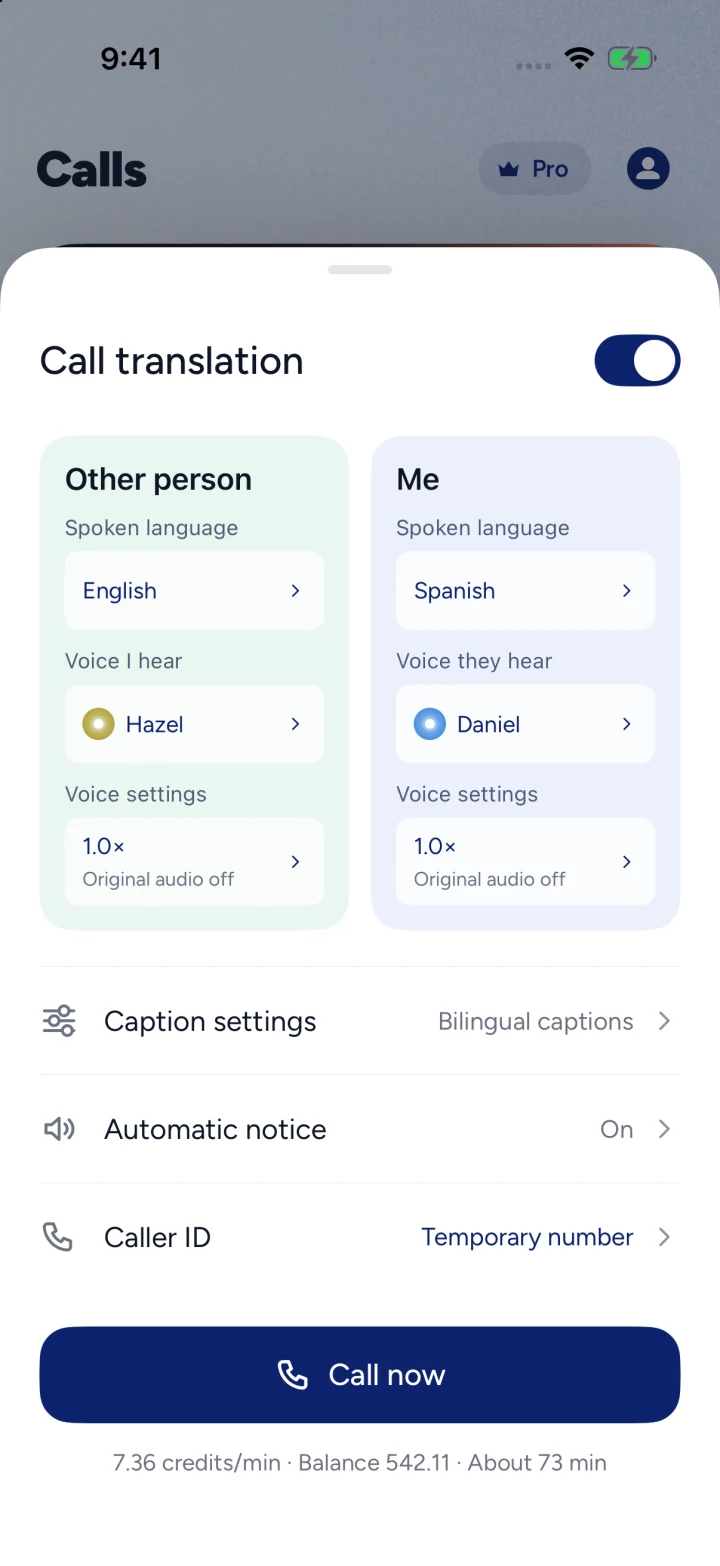
Yes. Start the call inside Talkalo, select both languages and enable two-way translation. Each person hears the other speaker’s translated words. Call only the destinations and numbers available in the app.
The recipient answers an ordinary supported mobile or landline call without installing Talkalo or opening a link. Your iPhone needs internet access. Bilingual captions appear in your Talkalo app; the regular phone recipient hears translated speech.
Chinese and English are among the phone language options, alongside Spanish, Japanese, Korean and others. Choose both languages before dialing and check the available pair. Language support is separate from country and number availability.
Outgoing calls need usable credits and are charged by destination and connected duration; ringing and preparation are not charged. Usable credits can be spent without an active Pro subscription. Pro provides recurring credits, and only subscribers can buy more credit packs; Pro is not unlimited calling. Check current prices and the destination quote in the app.
Verify your number for supported outgoing caller ID. Incoming translation requires an active Pro subscription and a Talkalo receiving number. To receive calls made to your original number, separately set up carrier forwarding; availability and carrier charges depend on your location and carrier.
No. Place your translated outgoing call from Talkalo. Installing Talkalo does not add translation to an already connected system, WhatsApp, WeChat or FaceTime call.
The Talkalo app requires iOS 16 or later. Speech recognition and translation use online services, so an internet connection and microphone permission are required. Destination, language and service availability still apply.